
• Skip to main content
  • Skip to secondary menu
  • Skip to primary sidebar

FromThePage Blog

Crowdsourcing, transcription and indexing for libraries and archives

  • Home
  • Interviews
  • crowdsourcing
  • how-to
  • Back to FromThePage
  • Collections

Adding Context

Q: How do I provide context for readers?
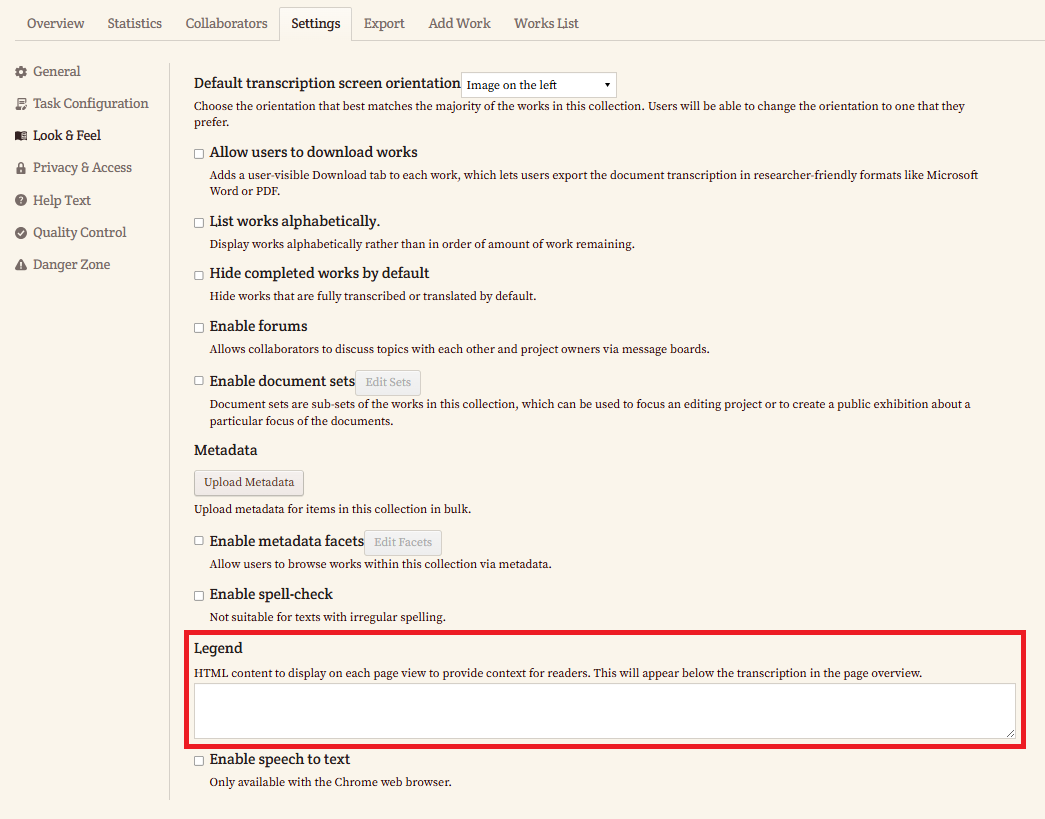
A: You can add contextual information for readers by using the Legend feature. Follow these steps:

  1. Go to the Settings tab of your collection.
  2. Click Look & Feel.
  3. Scroll down to the Legend section.
  4. In the Legend text box, add your content using HTML as needed.

The content you add here will appear on each page view of the collection, below the transcription in the page overview, helping provide helpful context for readers.
Primary Sidebar

What’s Trending on The FromThePage Blog

  • How to Handle Racial or Ethnic Slurs &…
  • How to Teach with Primary Sources using FromThePage
  • Project Profile: Stanford University Archives
  • How Good HTR is Changing What & How We’re Transcribing
  • Introducing Gemini 3.0 Support in FromThePage
  • How Do I Read Old Handwriting?

Recent Client Interviews

An Interview with Candice Cloud of Stephen F. Austin State University

An Interview with Shanna Raines of the Greenville County Library System

An Interview with Jodi Hoover of Digital Maryland

An Interview with Michael Lapides of the New Bedford Whaling Museum

An Interview with NC State University Libraries

Read More

ai artificial intelligence crowdsourcing features fromthepage projects handwriting history iiif indexing Indianapolis Indianapolis Children's Museum interview Jennifer Noffze machine learning metadata newsletter ocr paleography podcast racism Ryan White spreadsheet transcription transcription transcription software

Copyright © 2026 · Magazine Pro on Genesis Framework · WordPress · Log in