
You can export any work that has been imported from CONTENTdm via the export tab in the project owner dashboard for the collection. Make sure to input the CDM license key.
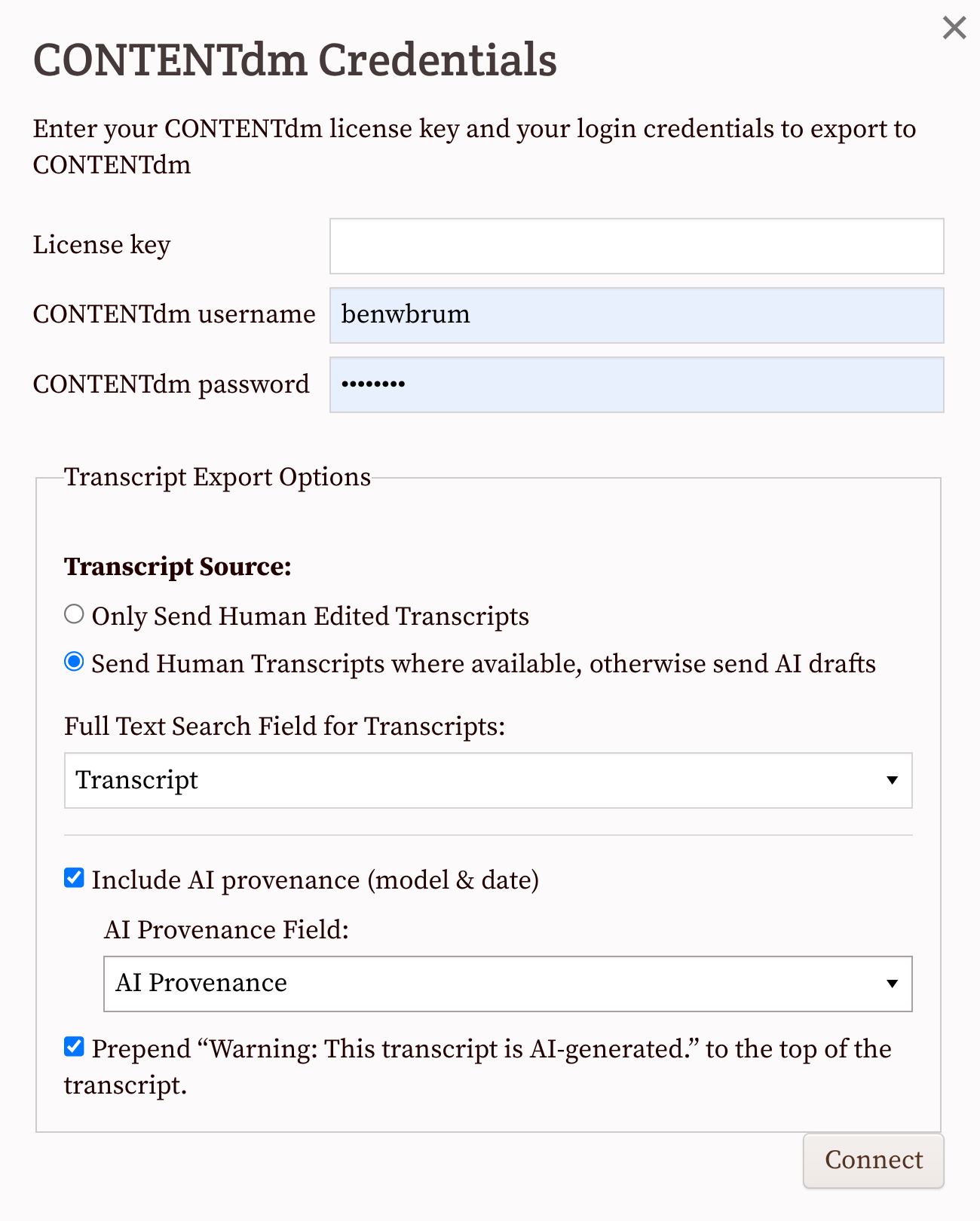
When exporting to CONTENTdm through its Catcher API, you can choose which version of the transcript to send: human-edited transcripts only or human-edited transcripts when available, with AI drafts as a fallback.
For AI drafts, you can also include provenance information. The export settings let you specify which CONTENTdm field should receive the transcript and whether to include AI provenance, such as the AI model used and the date the draft was generated. You can also choose whether to prepend a warning indicating that the transcript was generated by AI.
For human transcribed material, only (and all) the works that are 100% transcribed and have no pages marked "needs review" will be sent to CONTENTdm. We update the the field you've set up as full text search.
Whether you're sending AI or human transcripts, you'll need to update your index afterwards.
The next time you export to CONTENTdm, all of the 100% transcribed works will be sent, including the ones from the previous export.
It's not currently possible to export individual works to CONTENTdm.
You can see an example of an exported transcript in CONTENTdm on this letter from the Sandy Spring Museum. (Click on "transcript" immediately under the page image.)
For more details on the CONTENTdm integration, see Crowdsourcing with CONTENTdm and FromThePage.